Construction Operating System · Web + iOS

One OS for the field.
Not five apps that don't talk.

Scheduling, equipment, safety, and operations in a single role-aware system — with a native iOS app the crew actually carries. Built by people who've run the jobs, and running live on projects today.

/dashboard
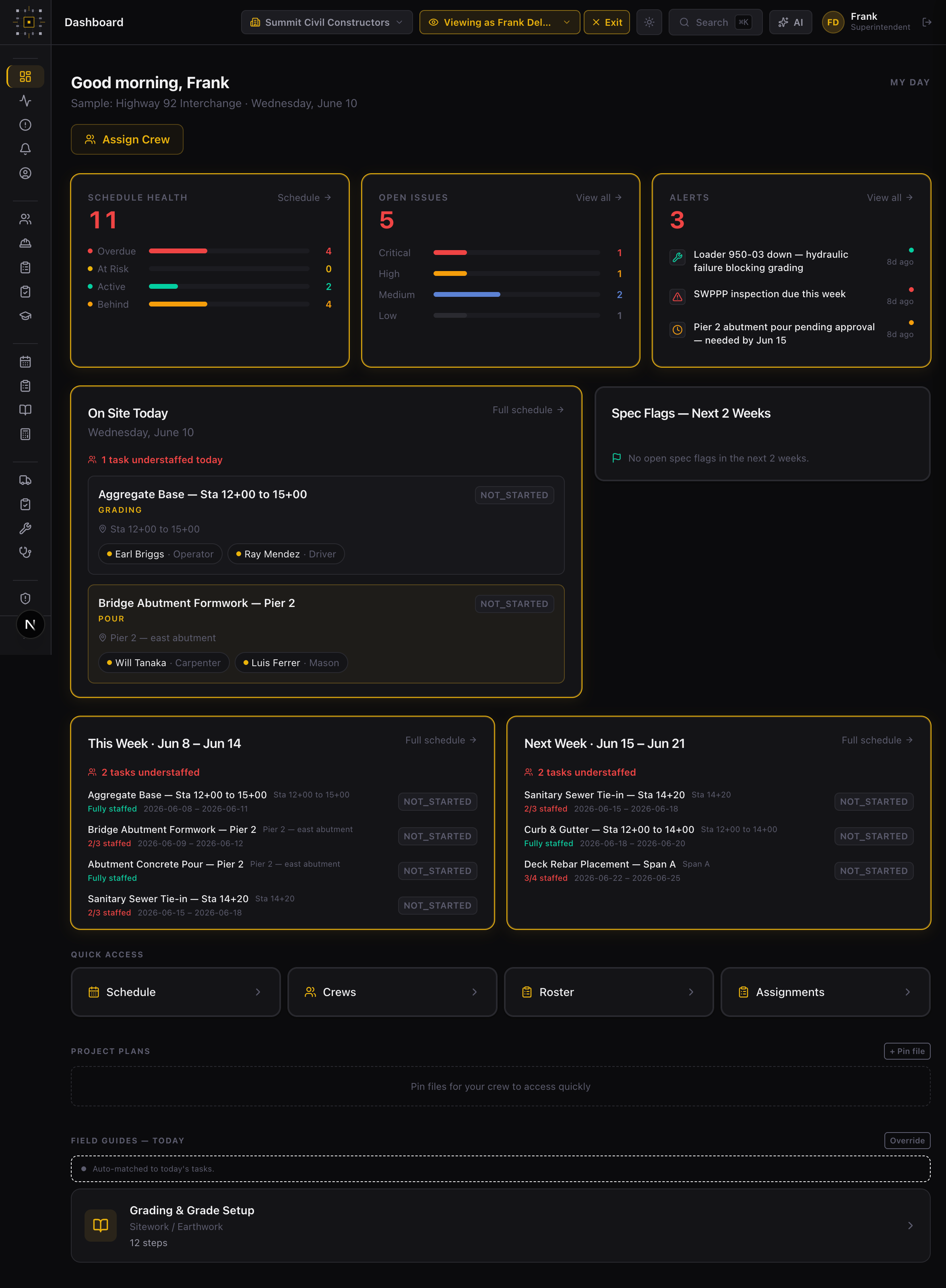
BedrockOS dashboard showing schedule health, open issues, alerts, today's crews on site, and the two-week look-ahead for the demo project
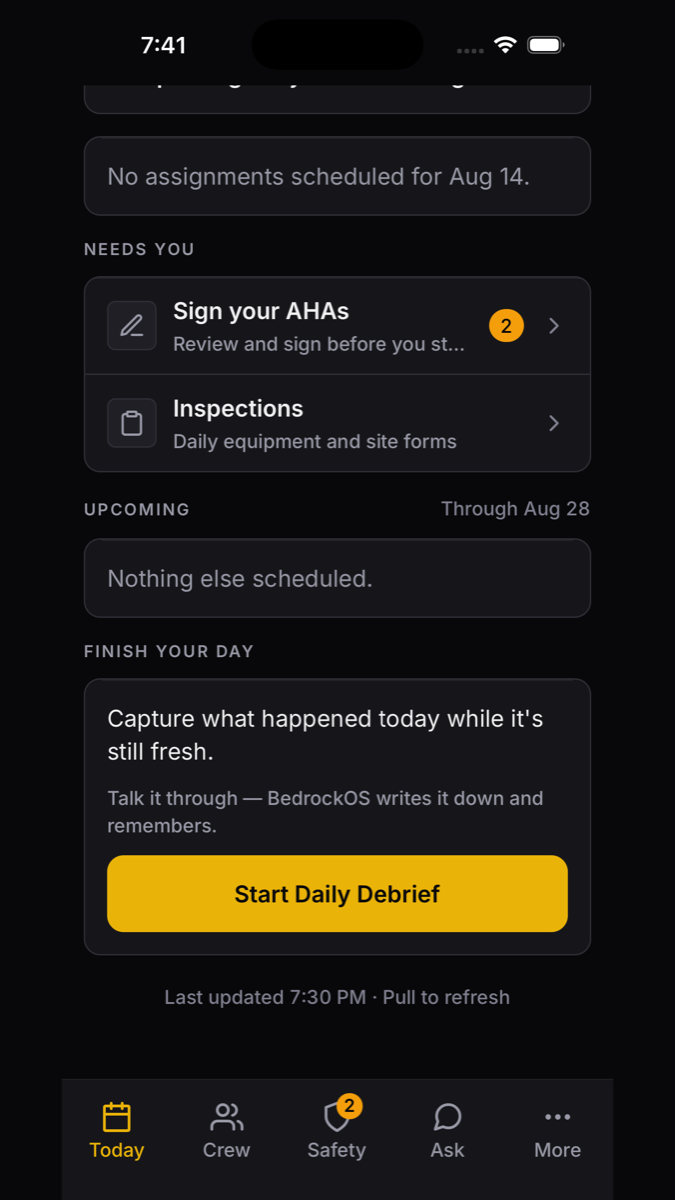
The BedrockOS iOS app showing today's shift, what's due before work starts, and the end-of-day debrief prompt
The problem

A job site runs on a dozen tools that have never met.

Scheduling in one app. Maintenance on a whiteboard. Pours in a group text. Inspections on paper. The information that should connect them lives in people's heads — and walks off the job when they do.

The usual stack
Five logins, five sources of truth
A broken machine nobody told the scheduler about
Pre-trips and daily logs in a truck-cab binder
The day's decisions leaving with the super at 3:30
BedrockOS
One system, scoped to your project and your role
Equipment readiness feeds pour planning automatically
Filed from the phone, in the system the moment it's done
Two minutes of talking becomes searchable project memory
The field app · iOS

The jobsite half of the system, in your pocket.

Not a shrunk-down website. A native app a foreman opens wearing gloves — one hand, at arm's length, in the sun — to run a pre-trip, report what they just found, or ask a question about the spec.

Today — the shift, the crew, and what's due before work starts.
Inspections — equipment pre-trips and site forms, the machine picked from that jobsite's fleet.
Drafts survive a dead zone, a force-quit, or a phone in a puddle of a pocket.
Ask the job — the specs, the drawings, and the federal standards, from the phone in your hand.
Today screen — what's due before work starts, inspections, and the end-of-day debrief prompt
Todaythe shift, and what's due
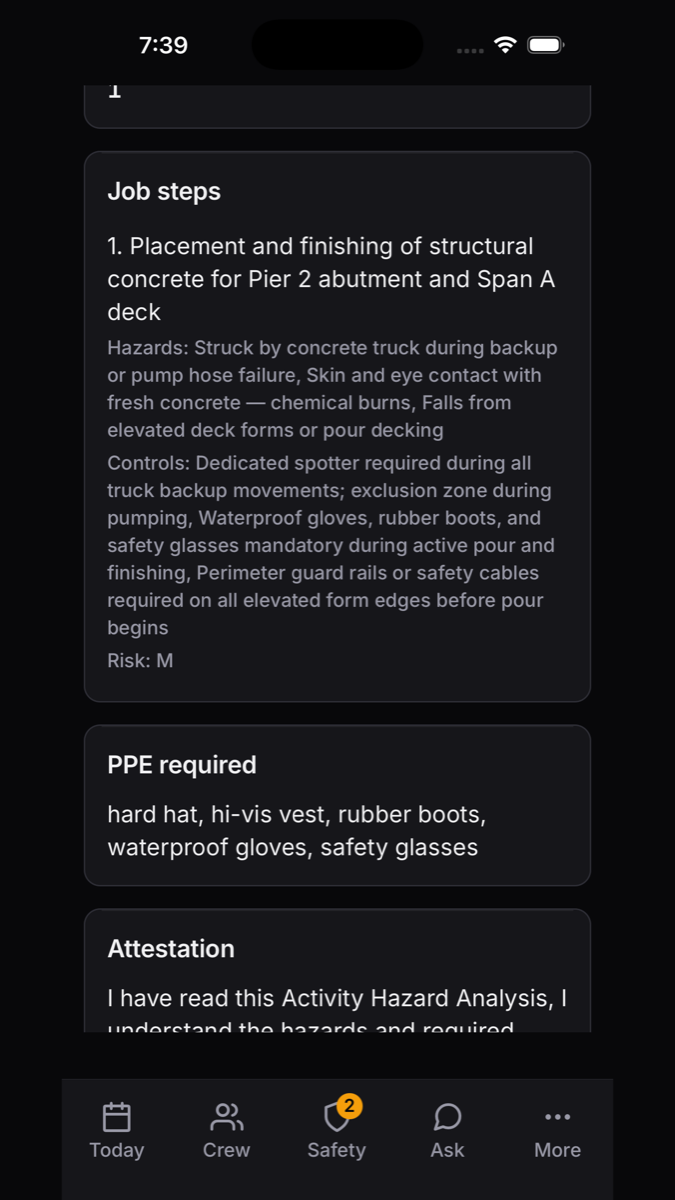
An Activity Hazard Analysis on the phone — job steps, hazards, controls, required PPE, and the attestation to sign
Sign your AHAsteps, hazards, controls, PPE
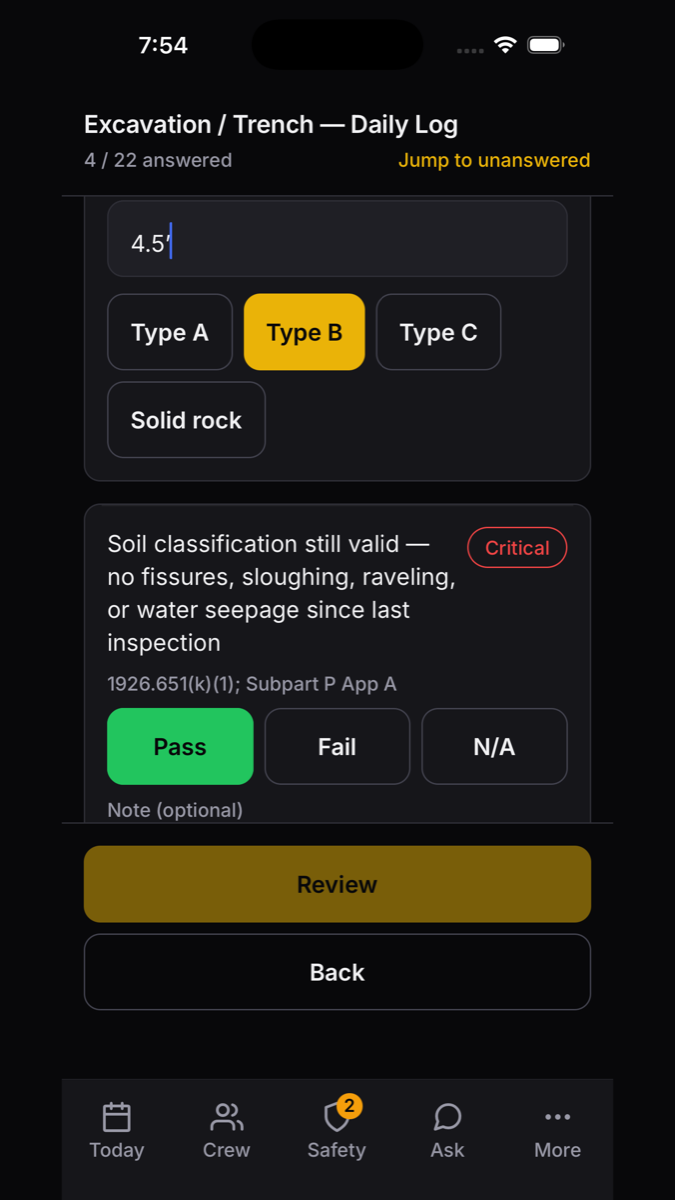
An excavation and trench daily log on the phone, with critical items flagged and the CFR reference on each line
Daily inspectionscritical items flagged, standard cited
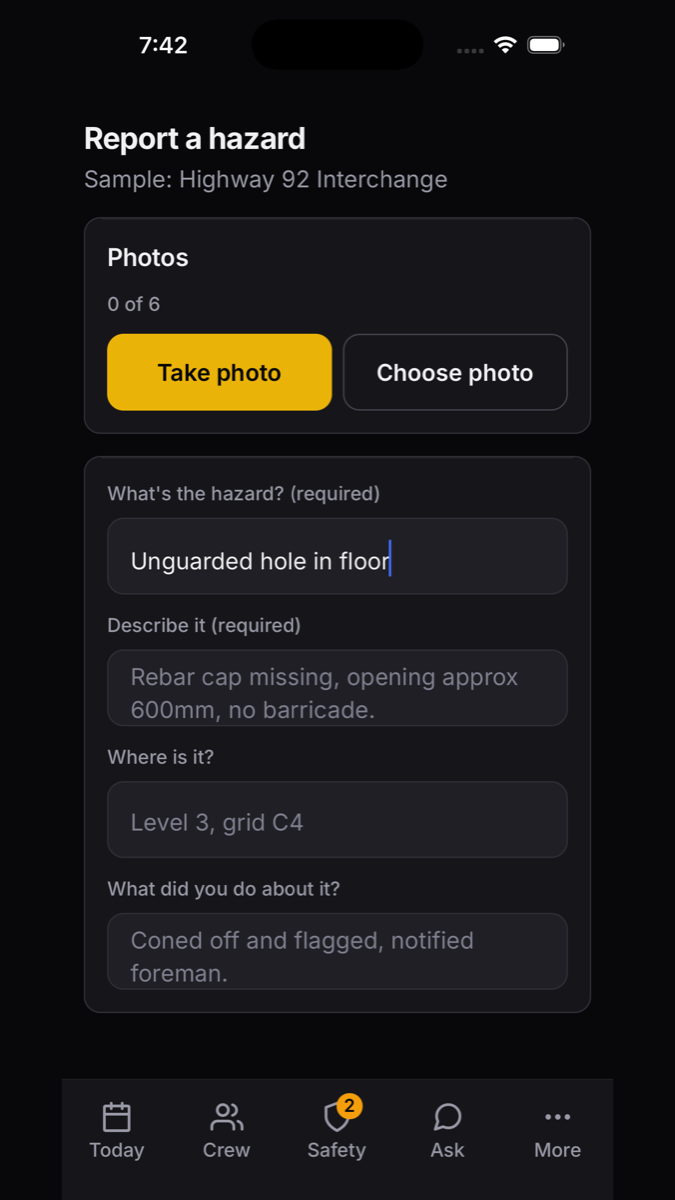
Reporting a hazard from the phone with photos, location, and the immediate action taken
Report a hazardphotos, location, what you did
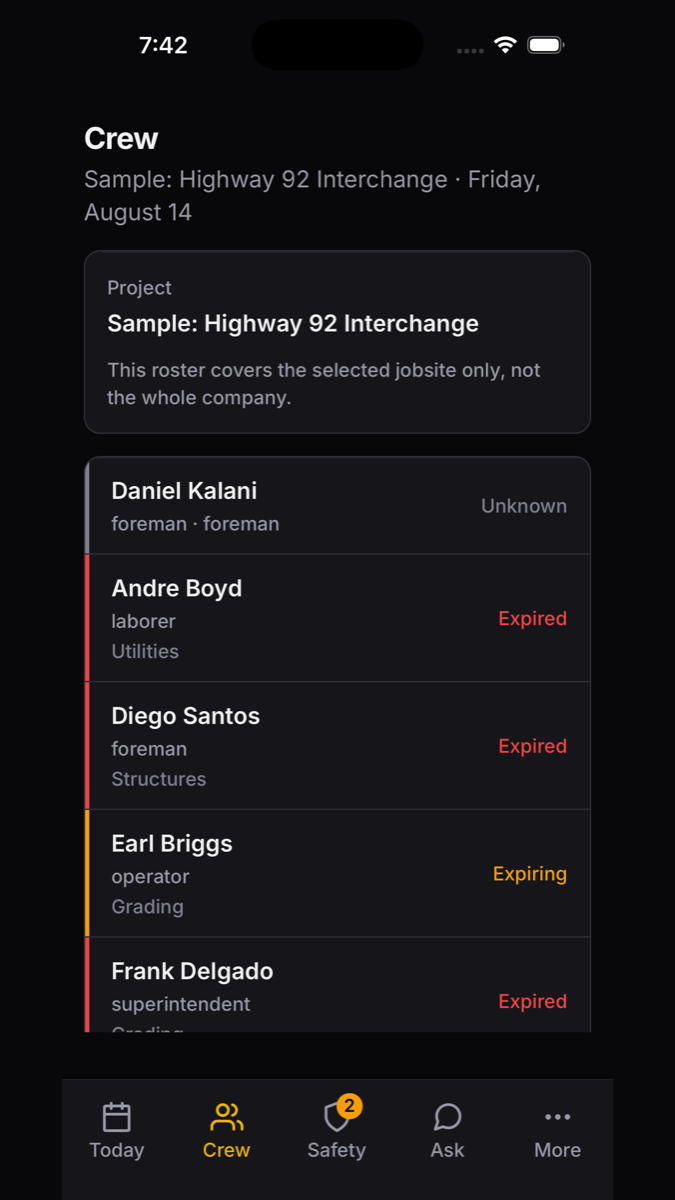
The crew roster for one jobsite, showing each worker's role and trade
Your crewwho's on this jobsite today
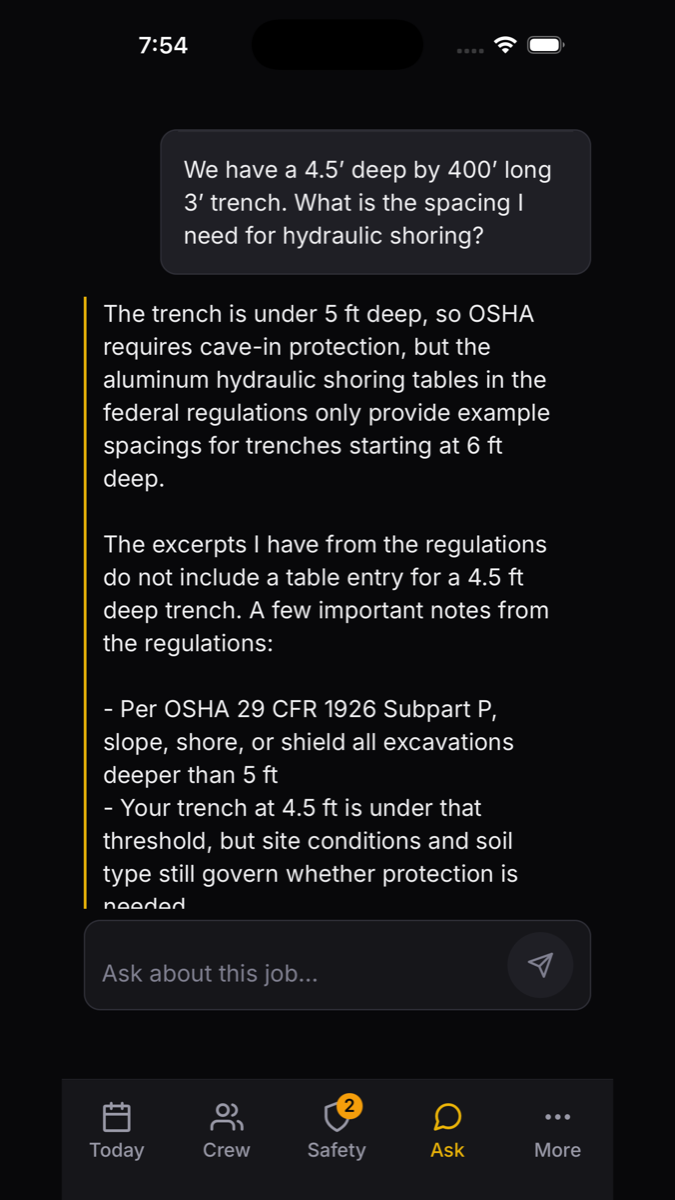
Asking the project assistant about hydraulic shoring spacing and getting an answer grounded in 29 CFR 1926 Subpart P
Ask the jobspecs, drawings, the federal standards
Built for gloves and glare
Oversized touch targets and a dark interface that survives direct sun, so the app works one-handed at arm's length.
Your credentials, on you
Certifications, access passes, and driver's license with expiry dates — so a card is provable at a gate, and a renewal is filed from the yard.
Same system, not a copy
What a foreman signs on the phone is the same record the office sees. No export, no re-entry, no second database.
Daily Debrief

Talk for two minutes. Keep the whole day.

The knowledge that normally lives in one superintendent's head — why the pour moved, what the inspector said, who promised what — captured at the end of the shift by talking, and turned into structured project memory the whole team can ask questions of.

01 · Talk
Record
Walk to the truck and say what happened. Or type it, if the yard is loud.
02 · Transcribe
Written down
The recording becomes text. Nothing is recorded unless you start it.
03 · Extract
Pulled apart
Work completed, delays, decisions, commitments, tomorrow — each with the quote behind it.
04 · Review
You approve
Nothing is kept until the person who said it reads it back. Then it's searchable forever.
The end-of-day prompt on the Today screen: capture what happened today while it's still fresh
Finish your daya card, not a form
The assistant answering a trench shoring question with reference to 29 CFR 1926 Subpart P
Askthe same assistant on the web
Project intelligence

An assistant that has actually read the job.

Upload the specs and the drawing set, and anyone on the project can ask questions about them — on the web or the phone. Answers name the sheet or the section a crew can verify, and the tappable source opens an image of the actual page, so nobody takes it on faith.

Federal 29 CFR Company standards Project specs & drawings
Asked on the job"We have a 4.5′ deep by 400′ long, 3′ wide trench. What spacing do I need for hydraulic shoring?"
The answer quotes the federal text, states plainly that the shoring tables start at 6 ft and that no table entry covers 4.5 ft, and sends the call to the competent person — it reports the standards, it never plays lawyer.
29 CFR 1926 Subpart P Specs · p. 34 Drawings · sheet C-12
The standards are built in
All of 29 CFR Part 1926 plus the general-industry provisions crews get cited against, indexed from the official editions — not a summary somebody typed up.
Your library stays yours
EM 385-1-1 for federal work, internal safety programs, company standards — kept separate from the federal text and never confused with it.
The whole set, sheet by sheet
Drawing sets are read one sheet at a time, so a large civil set indexes in the background instead of in one long wait.
It says when it doesn't know
When the documents don't cover the question, it says so and points at the person who decides — rather than filling the gap with something that sounds right.
How it's built

The shell coordinates. The modules execute.

Everything is scoped to the project you're in and the role you hold. One company, many projects, one coherent system.

Layer 01
Platform
Multi-tenant by design. Each construction company runs as its own organization with isolated data, users, and module access.
Layer 02
Organization
The company's shared shell — people, equipment, and admin — spanning every project the org runs.
Layer 03
Project
The job. The dashboard, issues, alerts, and activity you see are scoped to the project you're standing in.
Layer 04
Work surfaces
The execution layers — the domains — where crews, mechanics, and engineers actually do the work, on the web and on the phone.
The domains

Eight surfaces. One spine.

Turn on what your operation needs — each domain is built to work alone and together.

WorkforceDirectory, crews, credentialsLive
FieldScheduling, look-aheads, guidesLive
EquipmentFleet, work orders, AI MechanicLive
SafetyIncidents, AHAs, OSHA 300/301Live
OperationsPours, requests, back officeLive
IntelligenceSpecs, drawings, regulationsLive
Field AppiOS, inspections, debriefsLive
ReportingAnalytics across the orgBuilding
Live in production
Building now
Roadmap: RFIs, submittals, unified document search
Workforce & Field

Put the right people on the right job, every week.

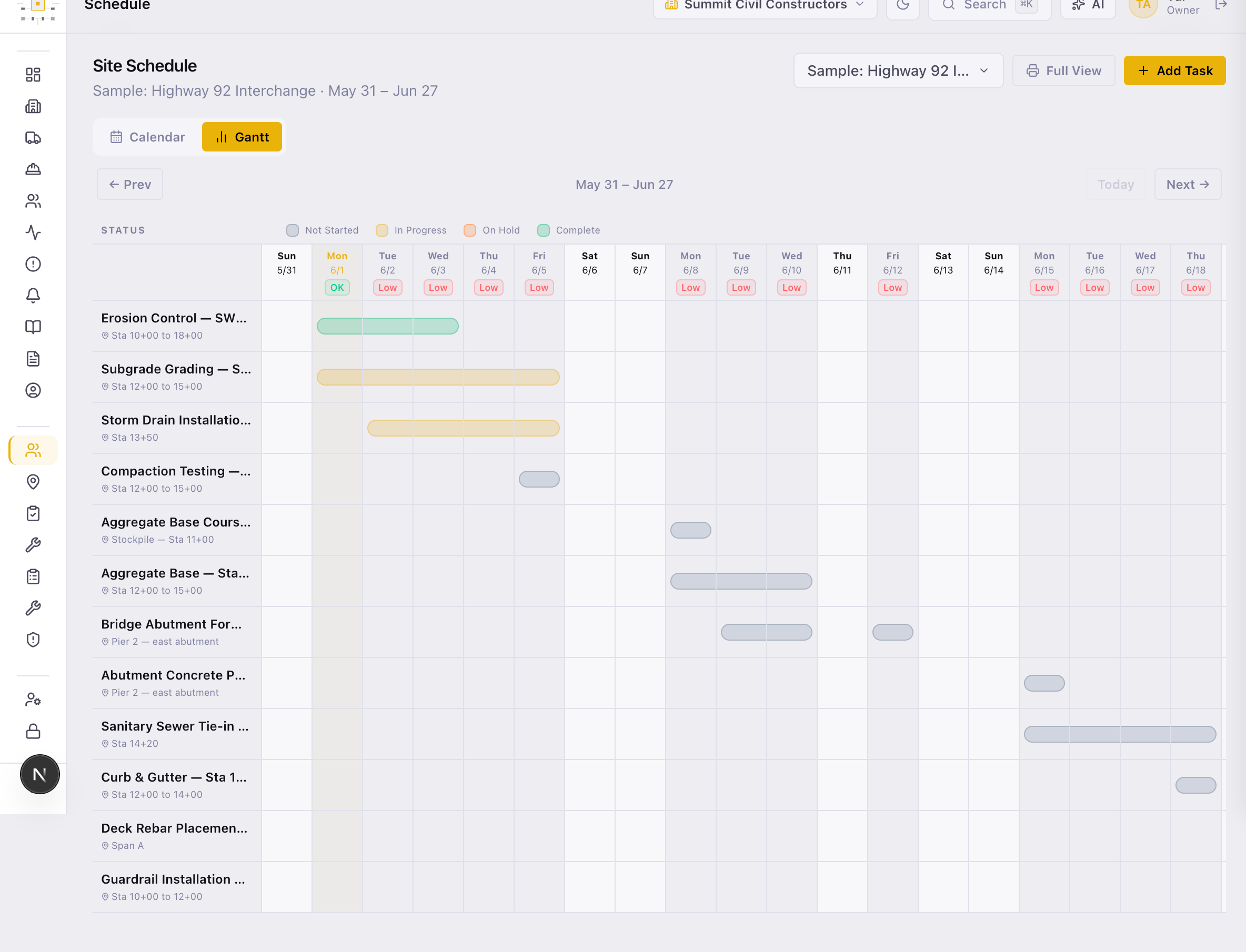
Roster the whole workforce, build named crews, and assign people across projects week by week. Run a site calendar and a scrollable Gantt, work a reusable task bank, and bulk-import tasks straight from a CSV.

Site calendar, scrollable Gantt, 3-week look-aheads
Cross-project weekly assignment + CSV task import
Credential tracking with expiry validation
/field/schedule
Field scheduling — a scrollable Gantt of site tasks across the look-ahead window
Equipment

Every machine accounted for — and ready when the pour is.

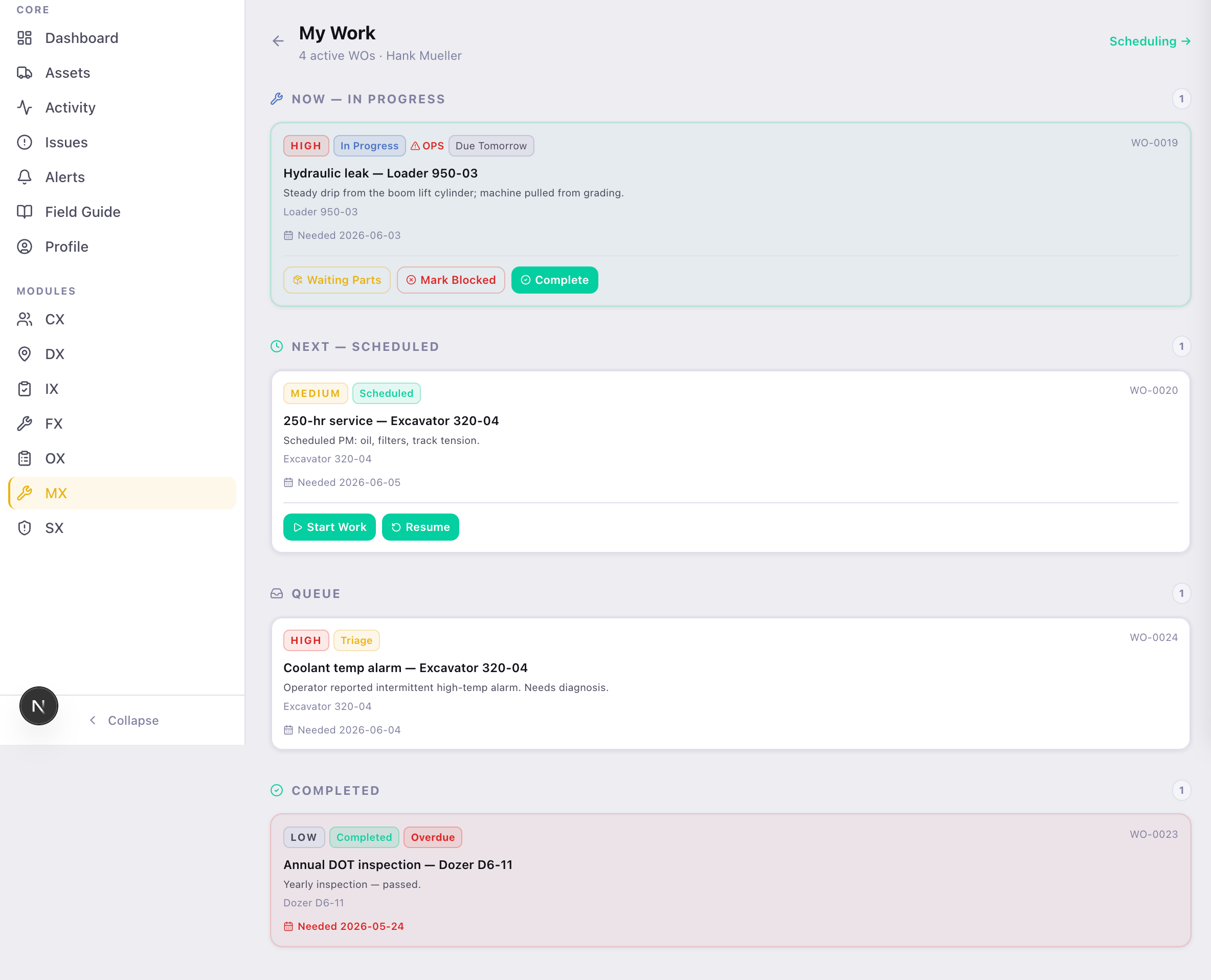
Mechanics work a personal "My Work" queue. Shop leads triage and assign work orders. Operators run the pre-trip on their phone, picking the machine out of that jobsite's fleet. And readiness doesn't sit in a silo — it feeds straight into pour planning downstream.

Personal mechanic queue ("My Work")
Equipment pre-trips filed from the cab
Readiness feeds Operations pour confidence
/equipment/my-work
Maintenance — a mechanic's personal My Work queue of work orders by status
Operations

Coordinate a pour without a single phone call.

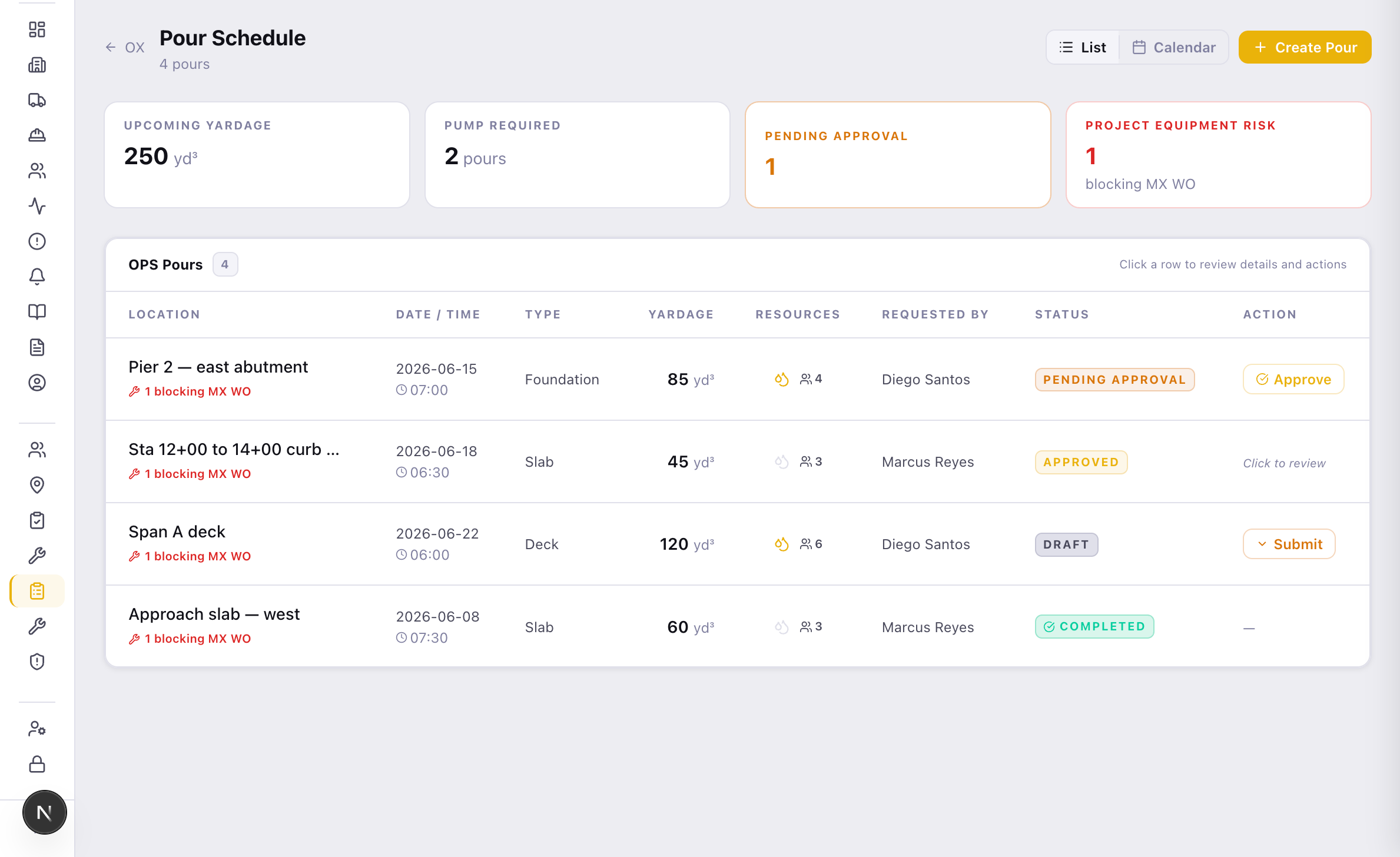
Dispatch field requests — masons, pump trucks, equipment — and coordinate company-wide concrete pours across list, calendar, and approval views. The request pulls live crew availability and spins up maintenance work orders where it needs to. Behind it sits the back office: access passes, certified payroll, contracts and POs.

Field request dispatch (masons, pumps, equipment)
Company-wide pour calendar + approvals
Back office: Passes & IDs, certified payroll, contracts
/operations/pours
Operations — the concrete pour schedule with yardage, resources, and approval status
AI Mechanic

Diagnose the machine before you call the shop.

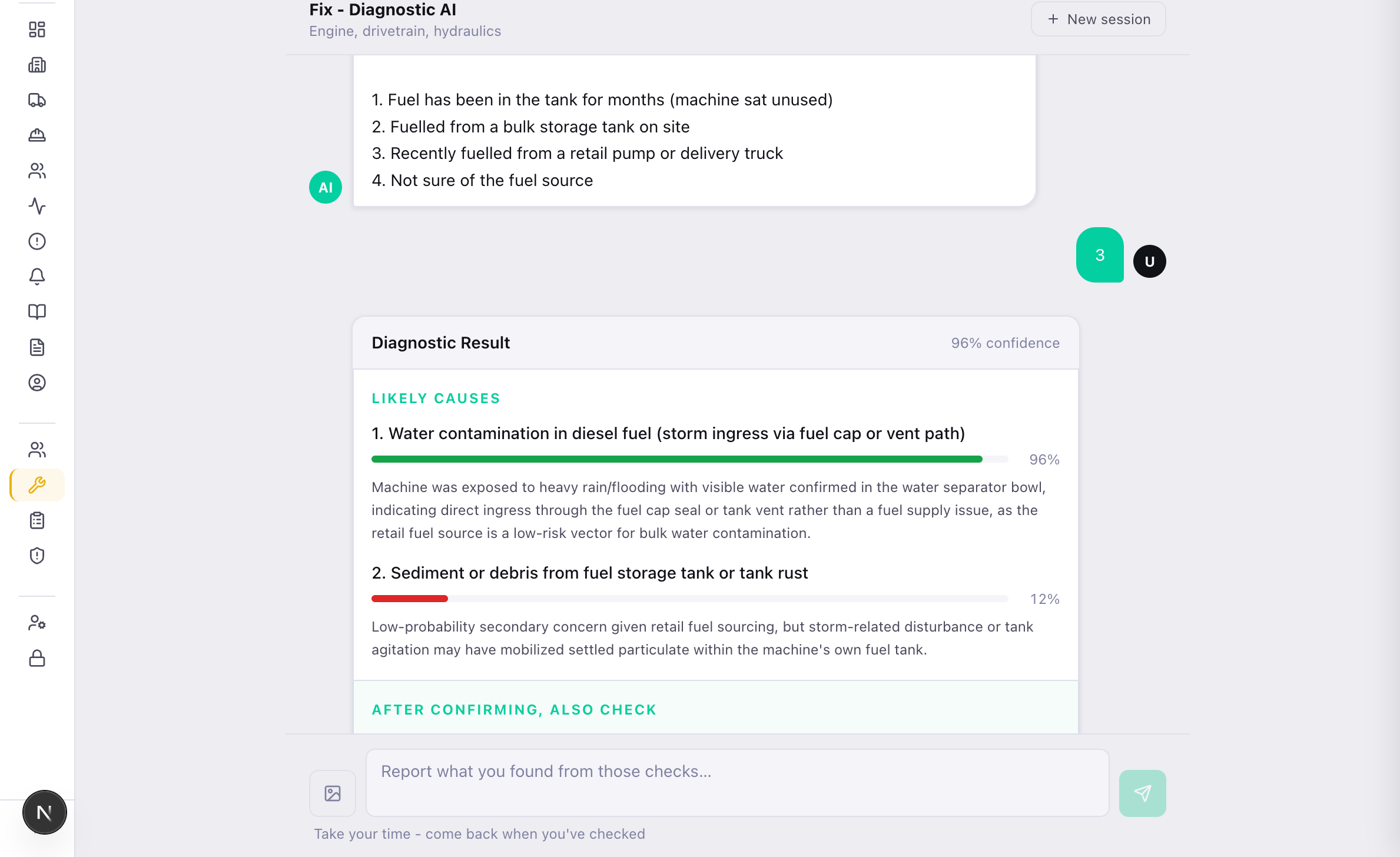
AI Mechanic is an AI diagnostic built for operators. Describe what the machine is doing — the noise, the warning light, the way it's running — and it works toward the likely cause. Plenty of issues turn out to be a quick fix the operator can handle on the spot. When it isn't, one tap escalates to the shop and opens a work order with the diagnosis already attached.

Operator describes the symptom in plain language
AI suggests likely causes and quick field fixes
Escalate only when needed — saves a call to the shop
/modules/fix/diagnose
AI Mechanic — clarifying questions, then a ranked diagnostic result with confidence and likely causes
Safety

Every incident recorded. Every OSHA obligation covered.

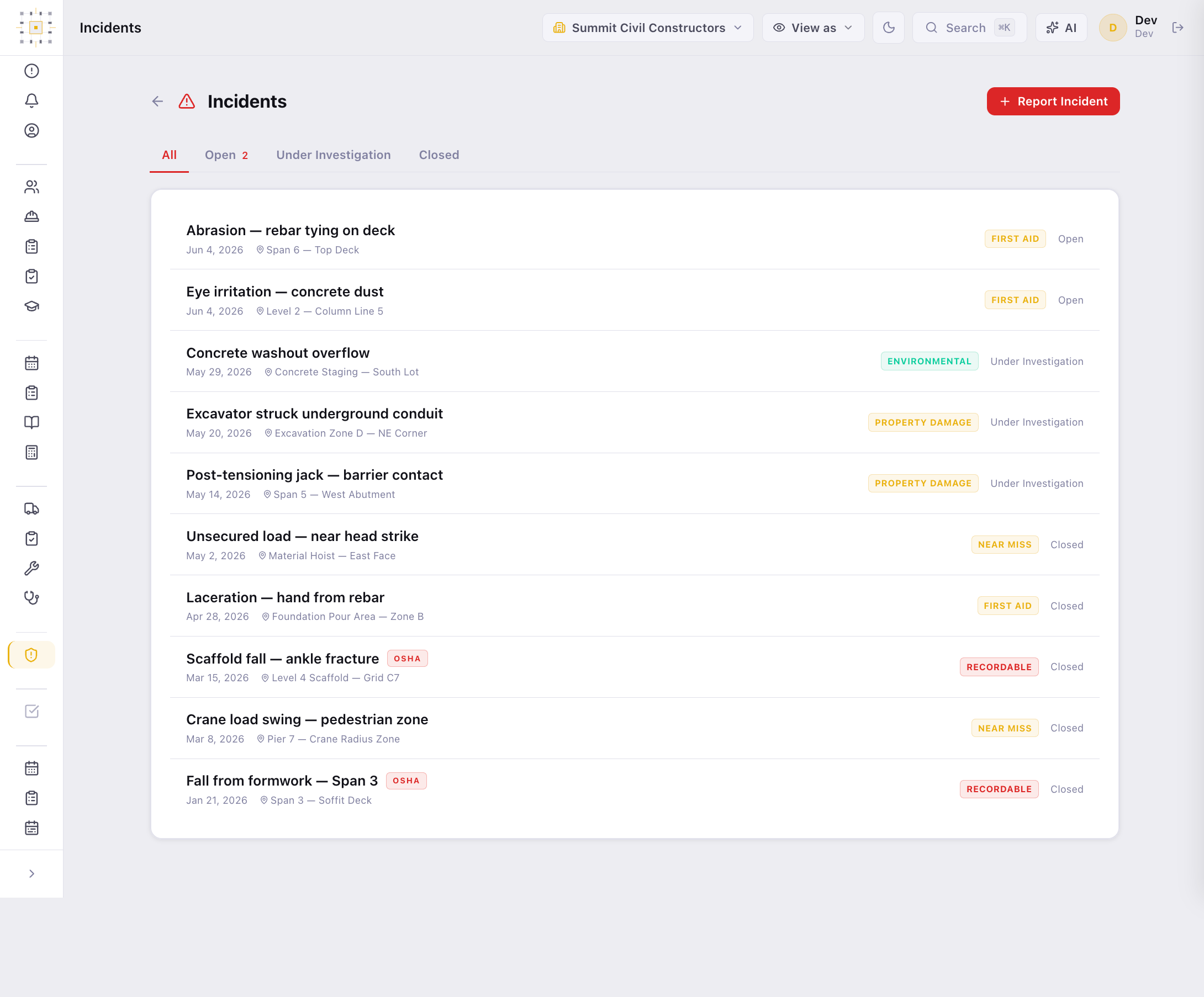
A full safety system — incident reporting, hazard and near-miss capture, activity hazard analyses, corrective actions, SDS library, and certification tracking with expiry validation. OSHA 300/301 records generate from your data with an audit trail, ready when the inspector arrives.

Incident, hazard, AHA/JHA, and near-miss reporting
OSHA 300/301 with AI recordability assessment
Corrective actions tracked from the hazard that raised them
/safety/incidents
Safety — the incident log with OSHA recordability flags, near-miss capture, and open investigation status
Why it's an OS, not a toolbox

The surfaces talk to each other.

This is the part nobody else has. The handoffs that normally happen over text, radio, and memory happen in the system — automatically, and across the phone and the office alike.

PhoneHazard reportedphotos, location, from the field
becomes
SafetyAn issuein the shared hub, not a text message
tracks to
ActionCorrective actionowned, dated, closed out
AI MechAI diagnosisoperator can't fix it in the field
escalates
EquipWork ordercreated with the diagnosis attached
OpsPour requestbeing planned
pulls live
FieldCrew availabilitybefore it's approved
spawns
EquipWork orderif equipment needs it

"Single OS, not point tools" is usually marketing. Here it's true in the code — these handoffs run in production on a live job today.

The shell

The platform layer everything runs on.

Beneath the domains sits the shared shell — the coordination surface every role touches, scoped to the project they're in.

Dashboard
Active projects, open issues, alerts, a module launchpad, and role-specific next actions.
Issues & Alerts
One hub every domain emits into — equipment, safety, and operations alike — with an activity feed the office and the field both read.
Field Guide
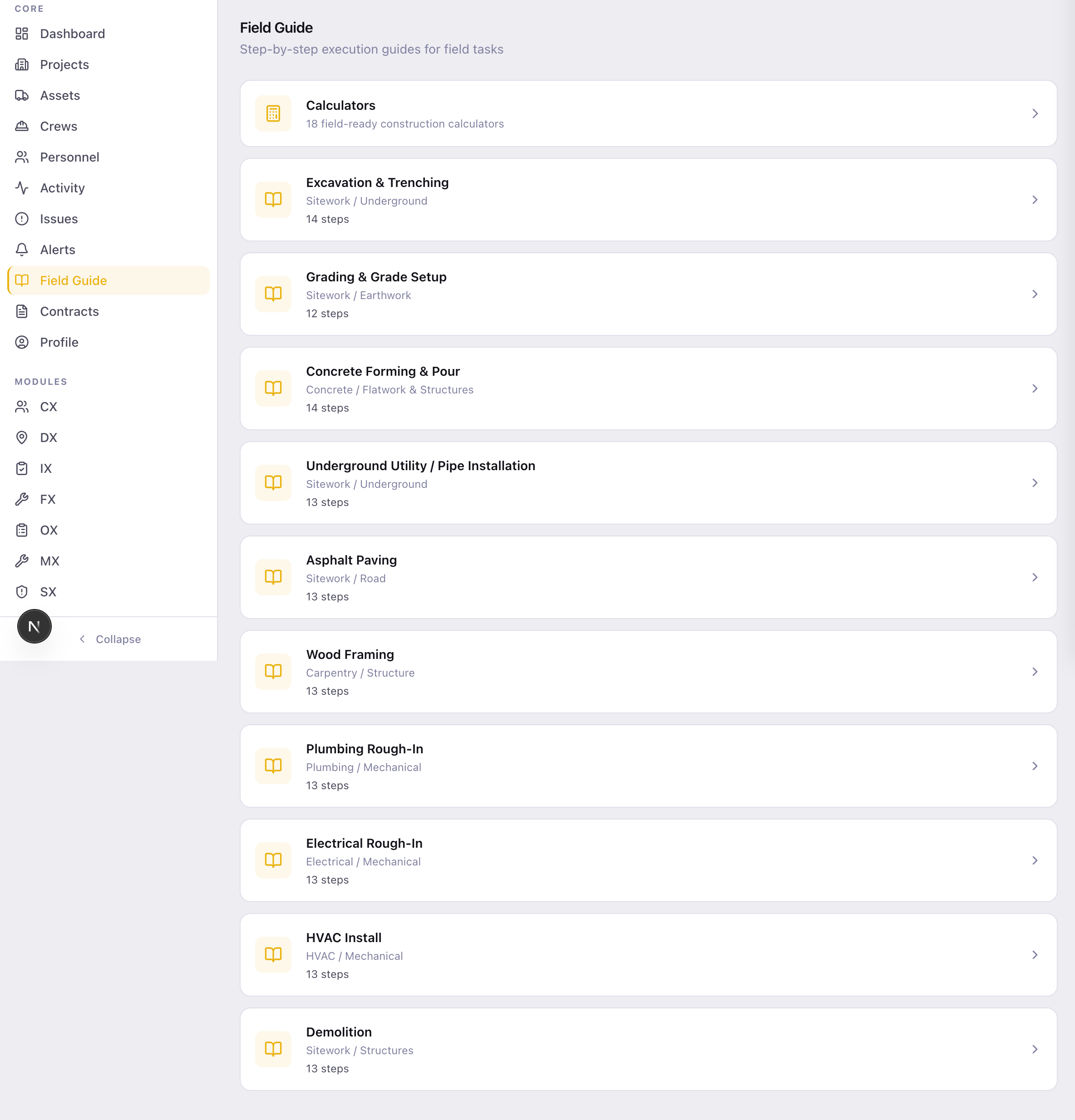
A cross-trade reference library by task type, plus 14+ embedded calculators — concrete volume, stair rise and run, pipe sizing, earthwork.
Back Office
Passes & IDs, certified payroll with rate schedules and a change log, contracts, POs, and subcontractor logs. Role-gated.
/field-guide
Field Guide — a library of step-by-step execution guides by task type, plus construction calculators
Role-aware by design

Everyone sees their version of the job.

Same system, scoped to the role — fifteen of them, from owner to viewer. A PM sees contracts and the whole project; a foreman sees today's crew and tasks; a mechanic sees their work queue. Access is built in, not bolted on after.

Org Admin
Company-wide
Manages users across the company and decides which domains and features are turned on for the org.
Project Manager
Full project
The whole project at a glance — contracts, purchase orders, budgets, and every surface on the job.
Superintendent
Schedule + field
Crews, the look-ahead, and pours across the project. The coordination seat, with contracts gated out.
Foreman
Today's work
Today's crew and tasks on the phone, a fast path to report what they find, and the debrief at the end of the shift.
SSHO / Safety Director
Safety, everywhere
Incidents, hazards, AHAs and OSHA records across every project — full access in Safety, read-only elsewhere.
Mechanic
My queue
A personal "My Work" queue of assigned work orders — nothing else competing for attention.
/dashboard · viewing as Superintendent
The dashboard as a superintendent sees it — schedule health, today's crews on site, and the two-week look-ahead
How it's licensed

Buy the bundle you run on.

Domains are packaged into bundles an organization turns on. Locked features are shown as locked, never quietly hidden — so nobody wonders whether the button is missing or the license is.

Field Ops
Workforce directory & crews
Scheduling and look-aheads
Field guide + calculators
Reporting
Equipment
Fleet register
Work orders & readiness
AI Mechanic diagnostics
Daily pre-trip inspections
Operations
Pour scheduling & approvals
Field requests
Company resource schedule
Back office
Safety
Incidents & hazards
AHAs and sign-off
OSHA 300/301
Certifications & SDS

The field app and the assistant come with the job, not as a fifth line item — the crew's phone reaches whatever your organization has turned on.

I'm a civil superintendent with 20 years in the field. BedrockOS started because I was running jobs out of five different programs and none of them knew about each other. So we built one that did.

Tui Alailima — Civil Superintendent, Founder of AIGA

See it on a real job.

BedrockOS is available to license now. Tell us about your operation and we'll walk you through the system that's running ours — office shell and field app both.

iOS · your crew is invited through TestFlight when your organization is onboarded